One file in. A backend on your Cloudflare.
One file in. A backend on your Cloudflare. A tiny backend for your next app. Describe your tables. Get a backend.teenybase turns one TypeScript file into a REST API with auth, access rules, migrations, OpenAPI docs and an admin panel, deployed to your own Cloudflare account. Open source, Apache-2.0.
Start herepick one, copy, paste
$ npx teenybase create my-app --yesThen cd my-app, npx teenybase deploy --local --yes and npx teenybase dev. Runs on your machine, no account.
$ npx wrangler login && npx teenybase deploy --remote --yesIn your project. Creates the D1 database, uploads secrets and deploys the Worker to your account.
$ npx teenybase deploy --temporary --yesIn your project. Deploys to a temporary Cloudflare account and prints a claim link: claim it within 60 minutes or it is deleted.
Use the teenybase CLI (run `npx teenybase docs`) to add a backend to this project.
Paste into Claude Code, Codex, Cursor or any coding agent.
Use teenybase (run `npx teenybase docs` first) to build the backend for a notes app in this folder: people sign up with email and password, write notes, and only see their own. Run it locally and show me it working.
Paste it into Claude Code, Codex or Cursor. No account needed to run it locally; step-by-step versions are below.
Quick start
01Every way to start ends with the same project: a teenybase.ts file, a Worker and a D1 database.
$ npx teenybase create my-app --yesThen cd my-app, npx teenybase deploy --local --yes and npx teenybase dev. Runs on your machine, no account.
$ npx wrangler login && npx teenybase deploy --remote --yesIn your project. Creates the D1 database, uploads secrets and deploys the Worker to your account.
$ npx teenybase deploy --temporary --yesIn your project. Deploys to a temporary Cloudflare account and prints a claim link: claim it within 60 minutes or it is deleted.
Use the teenybase CLI (run `npx teenybase docs`) to add a backend to this project.
Paste into Claude Code, Codex, Cursor or any coding agent.
localhost:8787: sign up, list with the token (one row), list without it (none: the list rule is auth.uid == id).# 1. Local: no account, runs on your machine $ npx teenybase create my-app --yes ✓ Project ready! $ cd my-app $ npx teenybase deploy --local --yes + Migrations applied $ npx teenybase dev CRUD: /api/v1/table/{table}/[select | list | view/:id | insert | update | edit/:id | delete] Auth: /api/v1/table/{table}/auth/[sign-up | login-password | refresh-token | ...] Swagger: http://localhost:8787/api/v1/doc/ui Admin: http://localhost:8787/api/v1/pocket/ (passwords in .dev.vars) # 2. Your Cloudflare account $ npx wrangler login $ npx teenybase deploy --remote --yes [creating the D1 database, uploading secrets, deploying the Worker, applying migrations…] # 3. No Cloudflare account yet: a temporary one, claim it within 60 minutes $ npx teenybase deploy --temporary --yes [prints the live URL, a claim link and when it expires]
Copy a prompt for your AI
02Paste one into Claude Code, Codex or Cursor in an empty folder. Each one runs as written: we ran all three, step by step, against the CLI before putting them here. The apps they made are in Real apps.
Set up the backend for a notes app with teenybase, in this folder.

1. Run `npx teenybase create notes-app --yes`, then `cd notes-app`.
2. Run `npx teenybase docs` and read config-reference.md (the rules section) and recipe-full-app.md in the folder it prints.
3. Edit teenybase.ts: keep the users table (email and password sign-up) and add a notes table with owner_id (a relation to users.id), title, content and is_public. Rules: anyone can list and view public notes; a signed-in user can create notes owned by themselves and list, view, update and delete only their own.
4. Run `npx teenybase deploy --local --yes`, then start `npx teenybase dev` in the background.
5. Check it with curl against http://localhost:8787/api/v1: sign up a user (include passwordConfirm), create one private and one public note with the token, then list notes with and without the token. Show me the results and the Swagger UI and admin panel URLs.
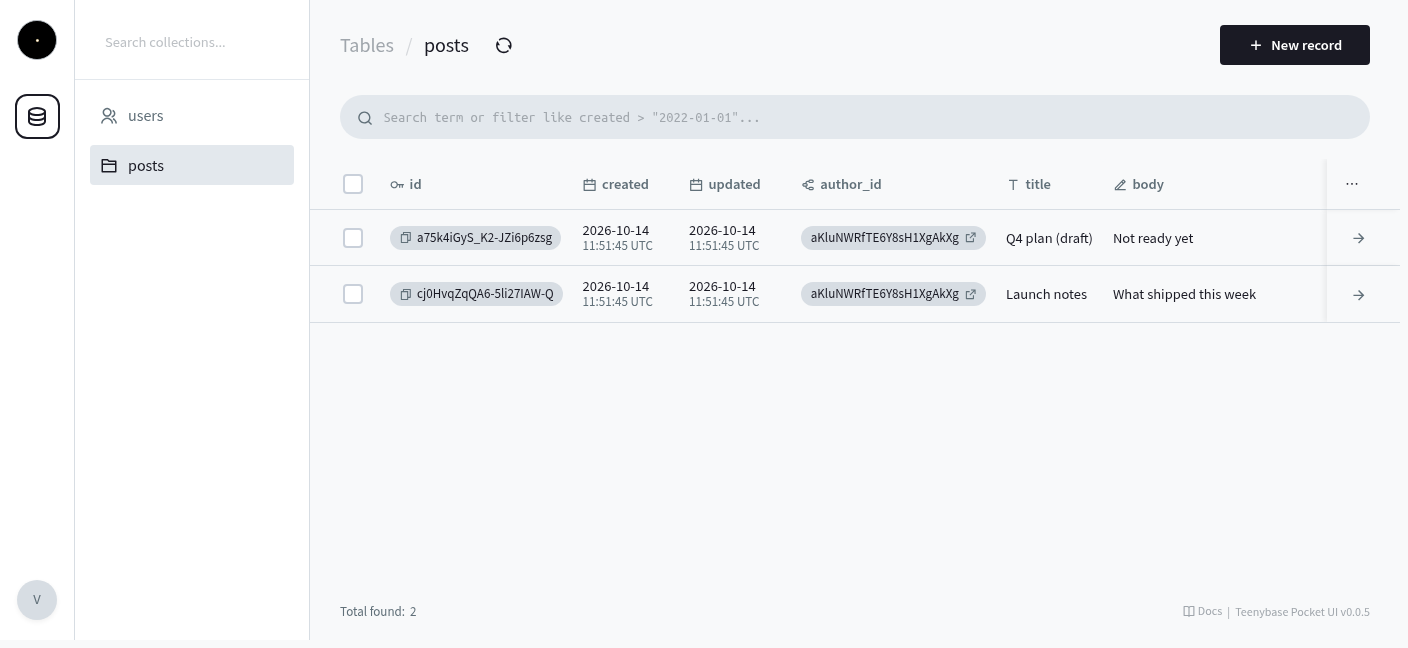
Add a backend for a small publishing dashboard with teenybase, in this folder.

1. Run `npx teenybase create dashboard-api --yes`, then `cd dashboard-api`.
2. Run `npx teenybase docs` and read config-reference.md (the rules section) in the folder it prints.
3. Edit teenybase.ts: keep the users table and add a posts table with author_id (a relation to users.id), title, body, status ('draft' or 'published', default 'draft') and published_at. Rules: anyone, signed in or not, can list and view published posts; authors also see their own drafts; only the author can create, update and delete their posts.
4. Run `npx teenybase deploy --local --yes`, then start `npx teenybase dev` in the background.
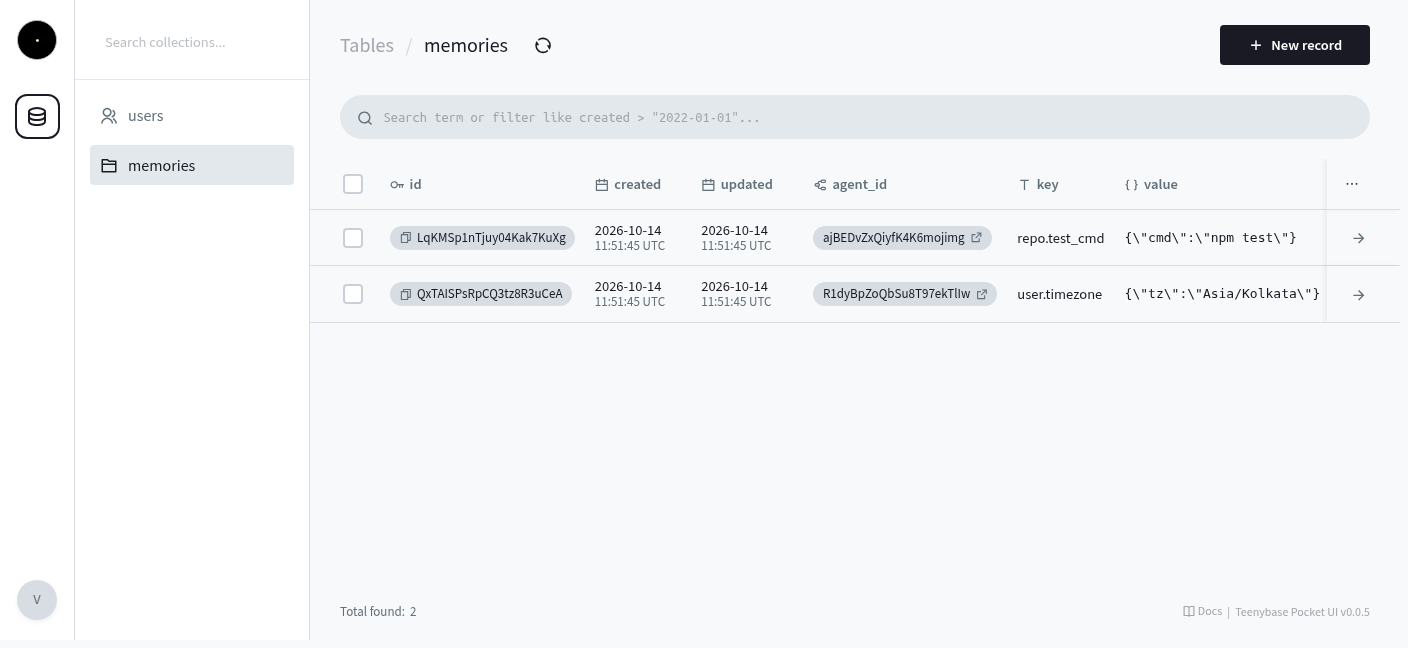
5. Check it with curl against http://localhost:8787/api/v1: sign up an author (include passwordConfirm), create a published post and a draft, then list posts without a token (only the published one), with the author's token (both) and as a second user (only the published one). Show me the results and the Swagger UI URL.Build a memory store for my AI agents with teenybase, in this folder. 1. Run `npx teenybase create agent-memory --yes`, then `cd agent-memory`. 2. Run `npx teenybase docs` and read config-reference.md (rules, indexes and the json field type) in the folder it prints. 3. Edit teenybase.ts: use the users table for agents (each agent signs up with its own email and password and gets a token). Add a memories table with agent_id (a relation to users.id), key, value (json) and tags, and a unique index on (agent_id, key). Rules: an agent can list, view, create, update and delete only its own memories. 4. Run `npx teenybase deploy --local --yes`, then start `npx teenybase dev` in the background. 5. Check it with curl against http://localhost:8787/api/v1: sign up two agents, write a memory as each, and show that each agent's list returns only its own rows and that one agent gets a 404 reading the other's memory by id. Show me the results and the Swagger UI URL.
No account needed: npx teenybase deploy --temporary --yes puts the same backend on a temporary Cloudflare account for 60 minutes; claim it to keep it.
What you get
03One file, teenybase.ts, describes your tables, auth and rules. From it you get:
Seven routes per table (select, list, view, insert, update, edit, delete) on D1 (SQLite), with an OpenAPI 3.1 spec and Swagger UI. Migrations are generated by diffing the config.
Email and password, OAuth (Google, GitHub, Discord, LinkedIn), email verification and password reset, with JWTs and refresh tokens.
Per table, in TypeScript strings like auth.uid == owner_id, compiled to parameterized SQL. A table with no rules is denied until you add them or mark it public: true.
At /api/v1/pocket/ in apps made from the templates: browse and edit rows. A fork of the PocketBase admin UI.
File fields stored in Cloudflare R2. Only needed if your tables have files.
The whole backend is one typed file an agent can read and change, and the CLI ships its docs and skills: npx teenybase docs, npx teenybase skills.
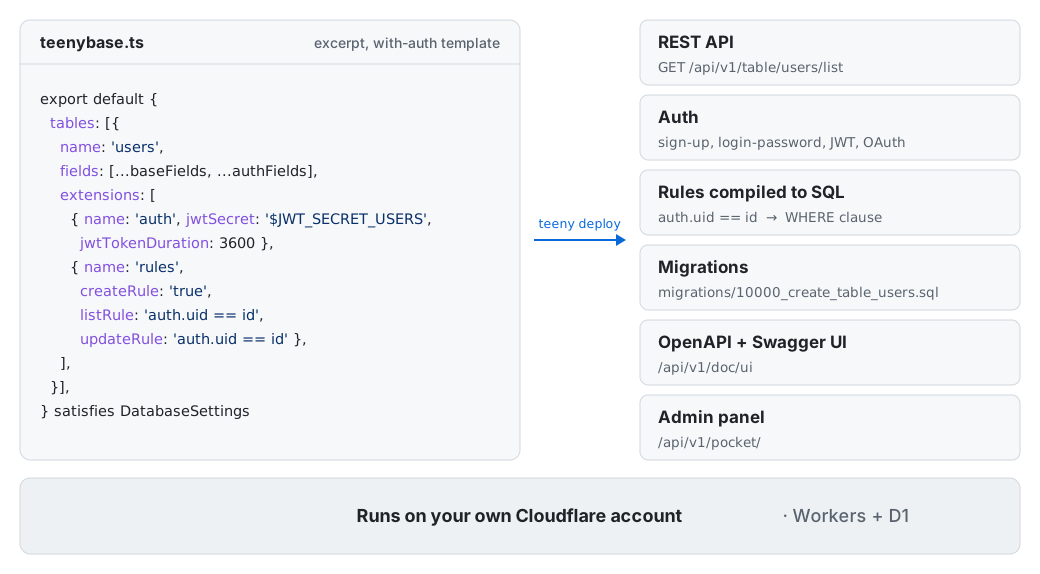
users table and what it turns into.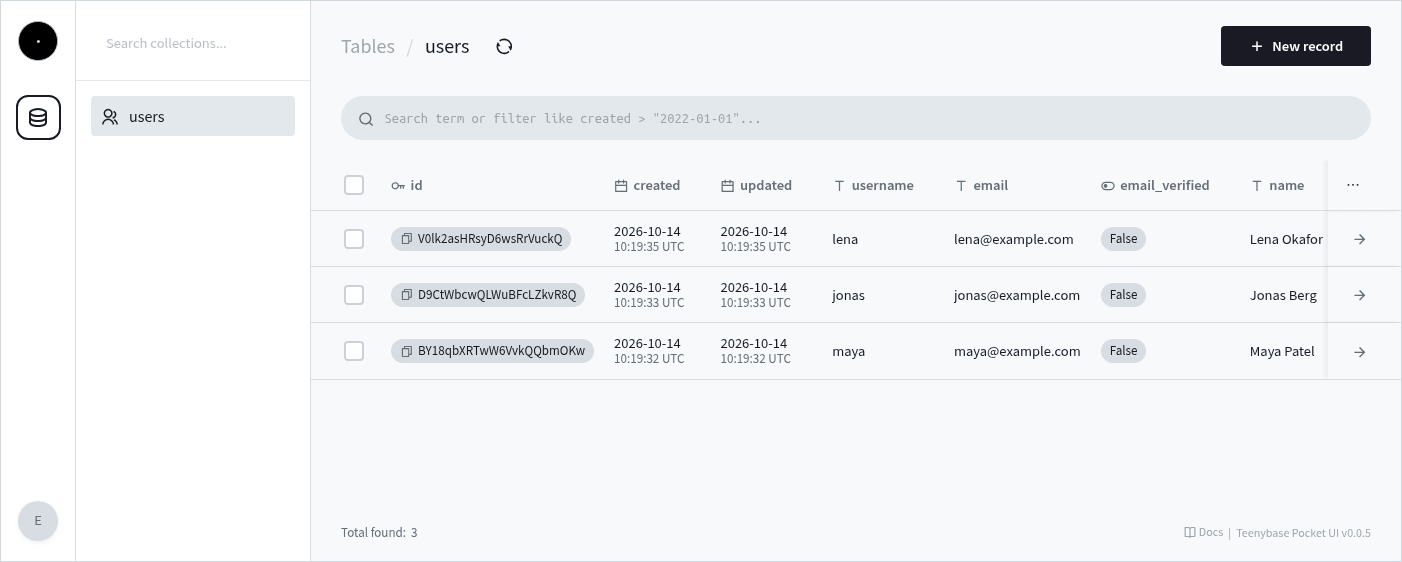
/api/v1/pocket/, a fork of the PocketBase admin UI (MIT).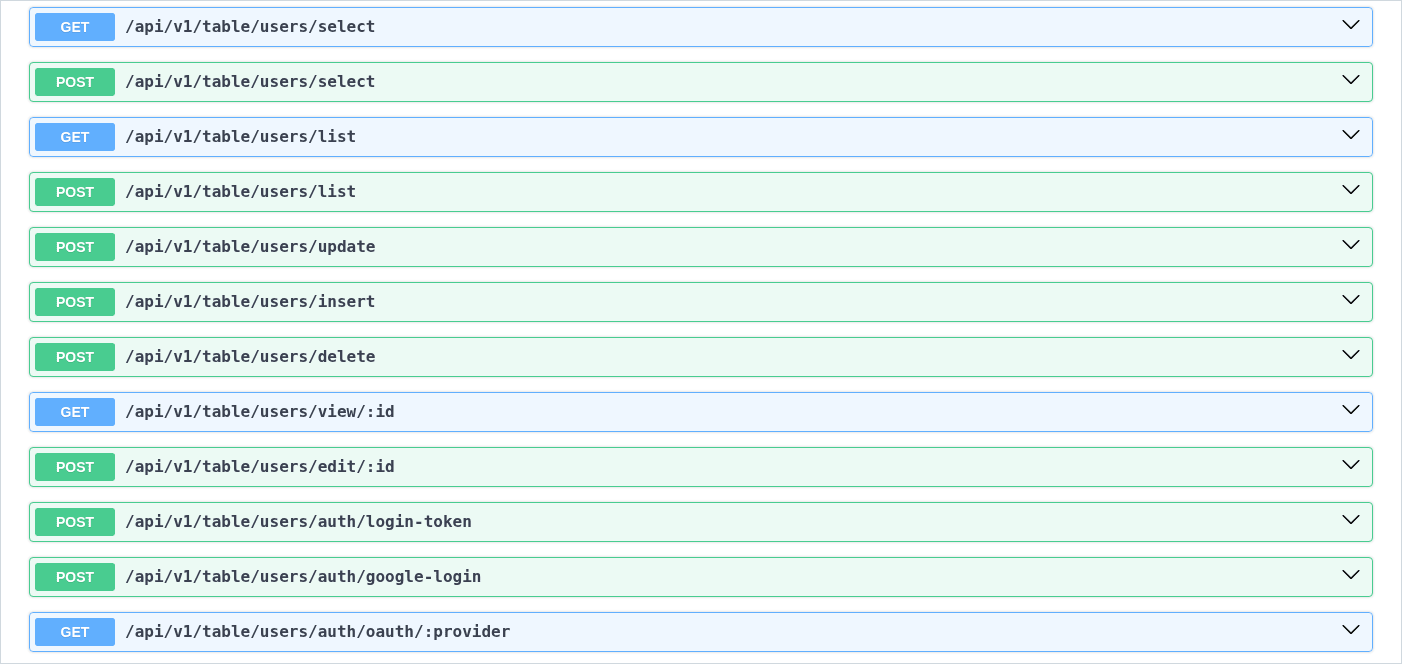
/api/v1/doc/ui, from the generated OpenAPI 3.1 spec.How rules work
04A rule is a small expression in your config. teenybase compiles it to SQL and appends it to the WHERE of every query on that table, so a row the rule doesn't allow is never read, changed or deleted. The signed-in user's id goes in as a bound parameter, never into the SQL text. Admin and service tokens skip rules.
teenybase.ts · users table (the with-auth template)
listRule: 'auth.uid == id'
Signed in as user u_7Hq2xK: the clause, then its bound parameter
({:fdxu9ko6l} IS ([users].[id]))
{"fdxu9ko6l": "u_7Hq2xK"}
Signed out
(NULL IS ([users].[id]))
teenybase.ts · notes table (prompt 1)
listRule: 'is_public == true | auth.uid == owner_id'
Signed in as user u_7Hq2xK: the clause, then its bound parameter
((([notes].[is_public]) IS 1) OR ({:fsah7kb48} IS ([notes].[owner_id])))
{"fsah7kb48": "u_7Hq2xK"}
Signed out
((([notes].[is_public]) IS 1) OR (NULL IS ([notes].[owner_id])))
auth.uid is NULL and no row's id is NULL, so the list is empty: the last line of the quick-start run above. Signed out, only public notes match.The SQL above is the output of teenybase's own compiler (src/sql/parse), the same call its rules extension makes for a list request; the parameter names are random per query. More in the rules reference.
Real apps
05Everything here runs on the current CLI. The pictures are captures from real runs, not mock-ups.
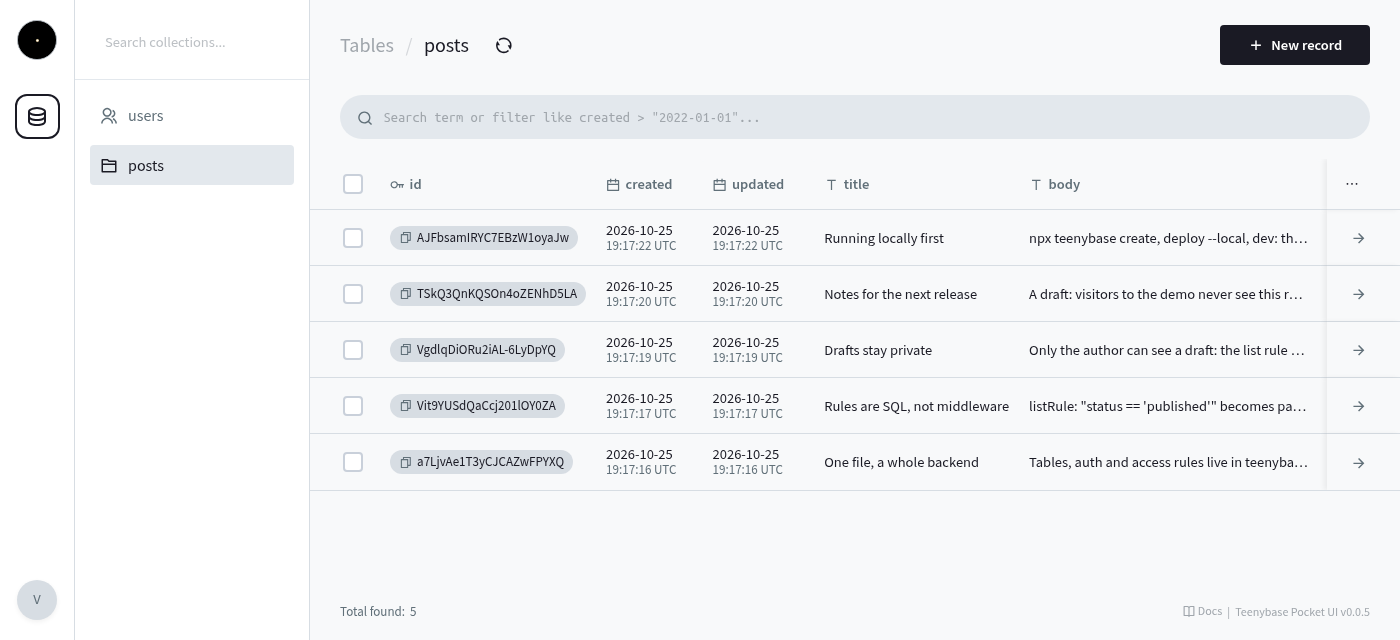
/api/v1/pocket/. Opens with a read-only viewer login.The admin panel is a fork of the PocketBase admin UI.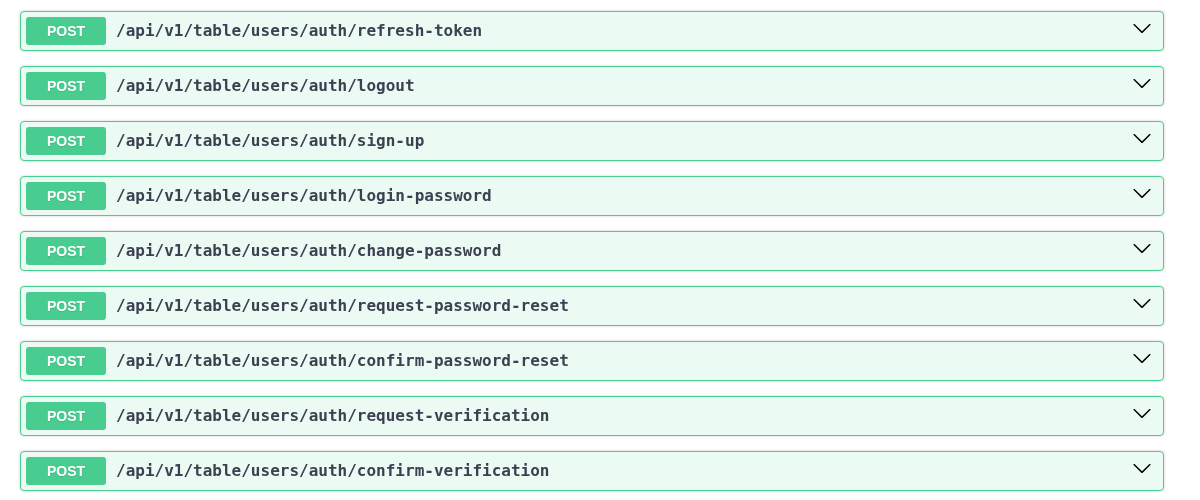
npx teenybase create my-app --yes: a users table with sign-up, login and rules, ready to deploy.Captured from a fresh project on the current CLI.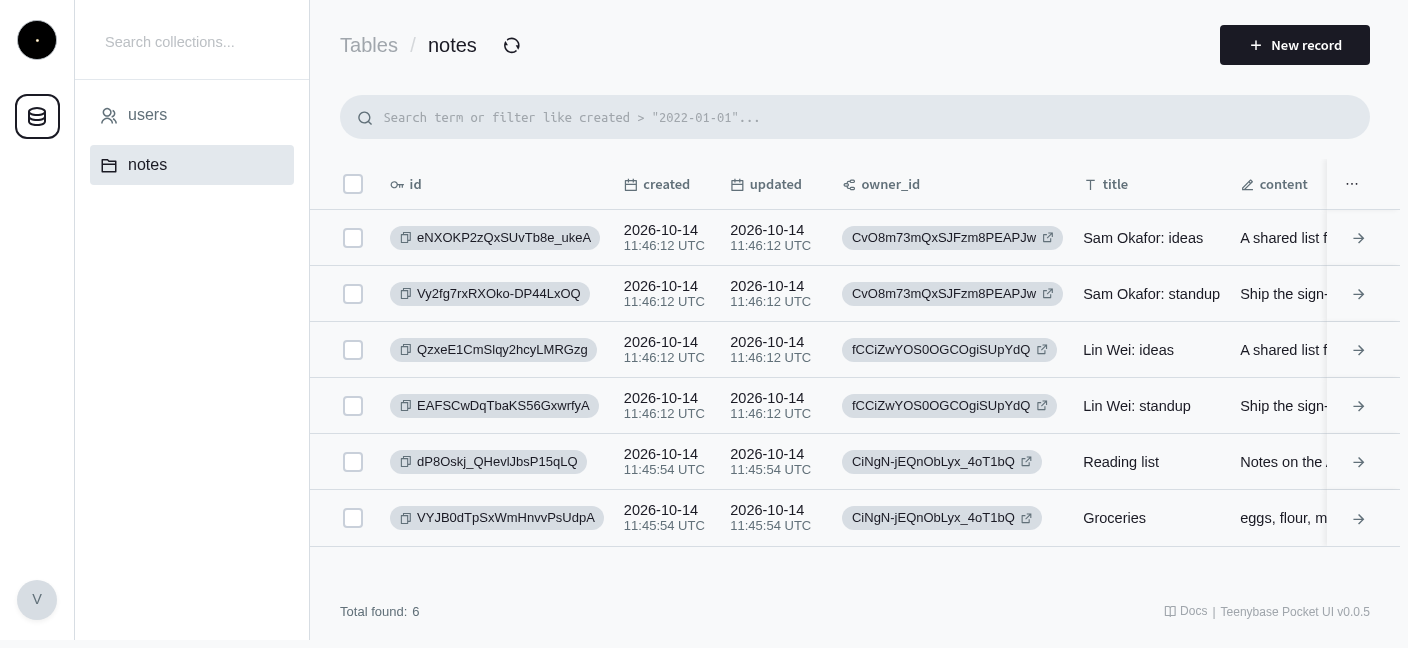
Questions
06What is teenybase?
Teenybase is an open-source (Apache-2.0) backend framework for Cloudflare Workers and D1: a teeny tiny Supabase for your own Cloudflare account. You define tables, auth, access rules and actions in one TypeScript file (teenybase.ts); teenybase turns it into a REST API with OpenAPI docs, generated SQL migrations, auth endpoints and an admin panel.
How do I try it?
Run npx teenybase create my-app --yes, then cd my-app, npx teenybase deploy --local --yes and npx teenybase dev. The API runs at http://localhost:8787/api/v1 with no account. To deploy to your own Cloudflare account, run npx wrangler login, then npx teenybase deploy --remote --yes. New: npx teenybase deploy --temporary --yes deploys to a temporary Cloudflare account without a login and prints a claim link; claim it within 60 minutes or it is deleted.
Where does my data live?
In a Cloudflare D1 database (SQLite) in your own Cloudflare account. npx teenybase backup exports the schema and data as standard SQL (remote export is blocked for databases with FTS5 tables, a Cloudflare limitation).
How much does teenybase cost?
Teenybase is free and open source. It runs on your Cloudflare account, so you pay Cloudflare directly for Workers, D1 and R2 usage; the Workers free plan is enough to start.
Is teenybase good for AI coding agents?
Your whole backend is one typed TypeScript file that an agent can read and change, and the CLI ships its docs and skills (npx teenybase docs, npx teenybase skills) so the agent can look up auth, OAuth, uploads and rules itself.
How does teenybase compare to Supabase?
Supabase is a Postgres platform (hosted or self-hosted); access control is written as SQL policies, and schema is usually managed in its dashboard or SQL migrations. Teenybase keeps schema, auth and rules in a TypeScript file in your repo and runs on your Cloudflare account. Supabase is the better fit for Postgres features, live subscriptions and a larger ecosystem.
How does teenybase compare to Firebase?
Firebase is a proprietary Google Cloud service with a document database. Teenybase is open source and relational (SQLite), and your data can be exported as SQL. Firebase is the better fit for live sync and mobile SDKs.
How does teenybase compare to PocketBase?
Both put schema, auth and rules in one place and have an admin UI (teenybase's is a fork of PocketBase's). PocketBase is a single Go binary you host yourself, manages schema in its admin UI and has live subscriptions. Teenybase is config-as-code in TypeScript and runs on Cloudflare Workers with no server to manage. PocketBase is more mature.
What are the limits?
Teenybase runs on Cloudflare Workers and D1 only today. A D1 database is capped at 10 GB (500 MB on the free plan) and has a single primary location. There are no live subscriptions: the API is REST only. Teenybase is early (v0.1), and APIs may change before 1.0.
Install and links
07$ npx teenybase create my-app --yesOr add it to an existing project: npm i teenybase. Always run it as npx teenybase: npx teeny is a different package.